For guidance on:
- Adding users
- Uploading students
- Creating sittings

Everything you need to set up, run and access your CAT4 results
Thank you for using CAT4 to build a deeper understanding of your students’ cognitive potential.
This page is your step-by-step guide to setting up and running your CAT4 digital or paper assessment, managing the process in Testwise, and accessing your reports.
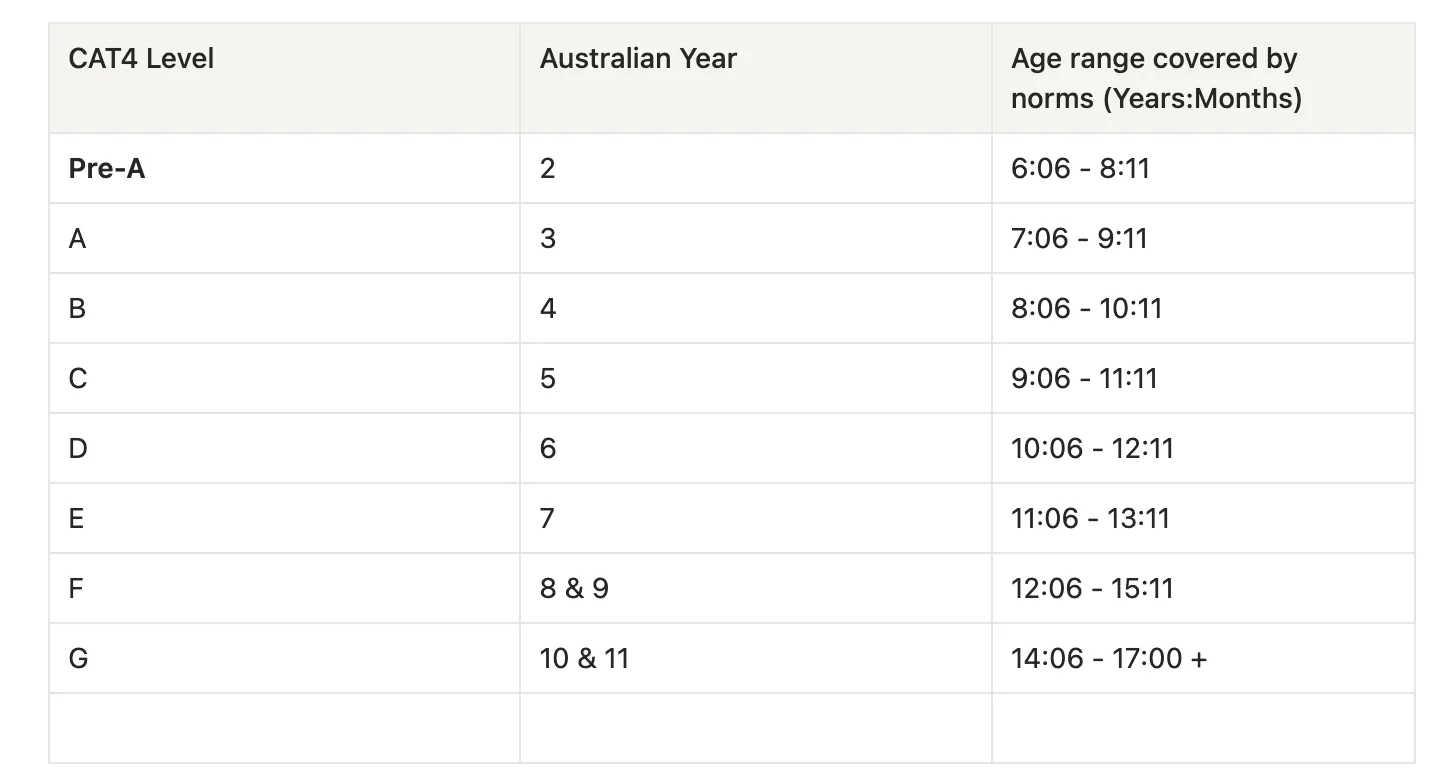
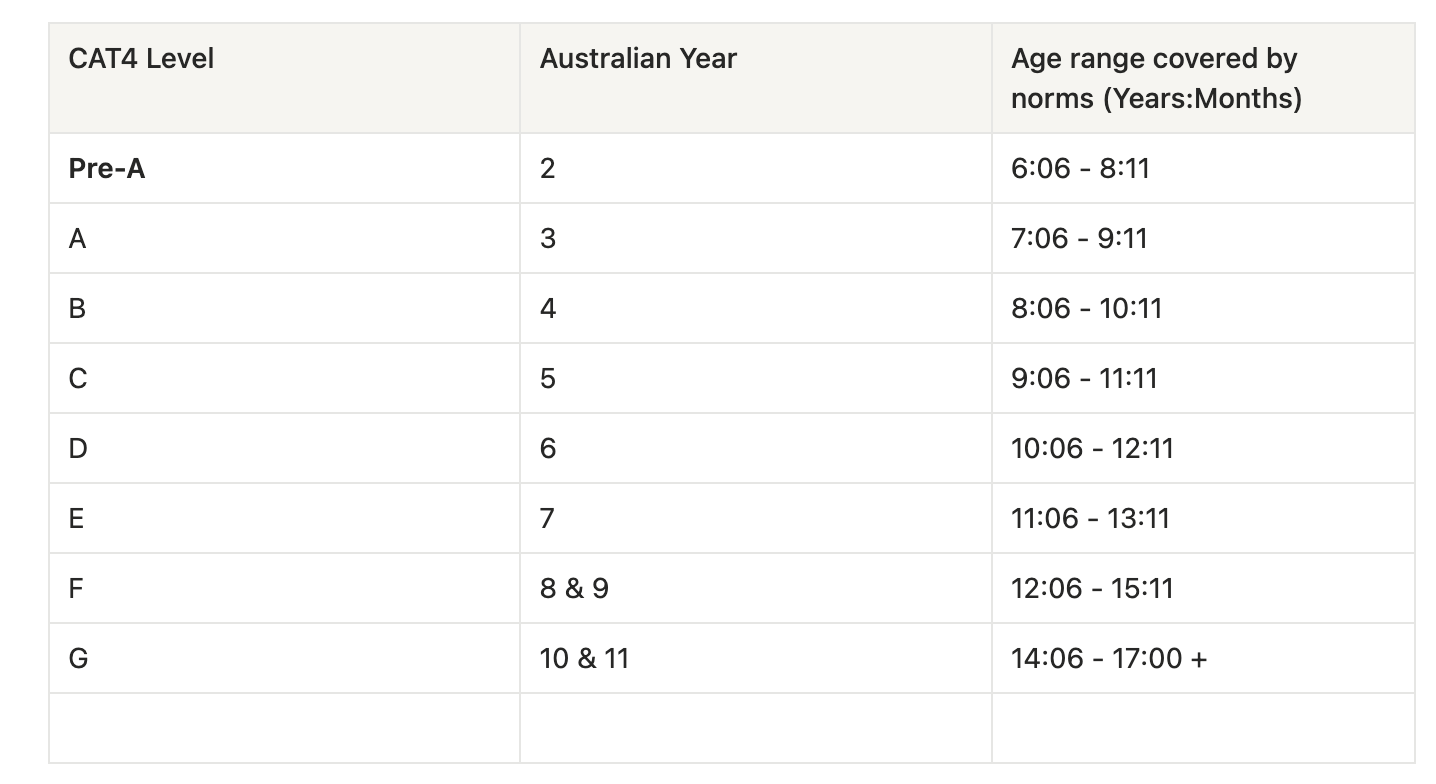
The table below outlines the Australian year level alignment and the age range covered by norms for each CAT4 paper level. These norms ensure student results are compared appropriately against peers of a similar age.
Use this guide when placing orders or creating sittings in Testwise.
For guidance on:
Live webinars:
Thursday 19 February – 4pm: Watch on demand
Thursday 26 February – 4pm: Watch on demand
Presentation slides are available following the session.


Join Helen Baber to explore how schools are using CAT4 meaningfully to inform teaching, planning and student support.
Helen Baber & CAT4 | Webinar Registration
Blank sheets are included with your delivery as backup.
Yes. You can update incorrect student details in Testwise even after the assessment has taken place. Updates will be reflected in any reports generated.
Please carefully review level guidance when placing orders to ensure you select the most appropriate materials.
If unsure, contact your Education Consultant.
Initial orders: minimum 10
Subsequent top-up orders: minimum 10
On the day of CAT4, students complete the assessment either online via Testwise or using paper booklets and answer sheets, depending on how your school is administering it.
Before starting, ensure students are allocated to the correct sitting and that devices or materials are ready. Follow the standard administration instructions and timings provided to maintain consistent test conditions.
For digital assessments, responses are submitted automatically in Testwise. For paper assessments, completed answer sheets must be returned to Renaissance Australia for marking.
For full administration guidance, including timings and preparation advice, please visit:
Duplicate answer: Each pupil must use one device and one browser session only
Tests should not be opened in multiple tabs or windows.
If a connection is lost or the browser is down, this may show duplicate session in place.
Once CAT4 testing is complete and marking has been finalised, reports are available to generate and download in Testwise.
Schools can access:
Individual student reports
Group and cohort reports
Summary data to support whole-school analysis
These reports provide insight into students’ reasoning strengths and areas for development, helping inform teaching, differentiation and transition planning.
For guidance on interpreting reports and using your results effectively, visit:
Renaissance recommends splitting the test into several sessions rather than completing it in one long sitting. This helps reduce student fatigue and keeps concentration high so the results are more reliable. Each session lasts about 40–45 minutes, including instructions and practice questions, and there should be short breaks between tests if they occur on the same day. Schools normally try to complete all parts within a short period (for example within the same week) so conditions are consistent.
Example schedule:
Day 1: Non-verbal reasoning tests (~45 minutes)
Day 2: Verbal reasoning + first quantitative test (~45 minutes)
Day 3: Second quantitative test + spatial reasoning (~45 minutes)
This structure spreads the cognitive load across multiple days, allowing students to stay focused while still completing the full CAT4 assessment within a reasonable timeframe.